Your radio. Your dashboard.
Explore the different modes, compare Lite and Full, and find the version that's right for you.
Download Lite
Free via Discord
Get Free Lite Edition
→
Get Full
Via Patreon
Become a Supporter
↗
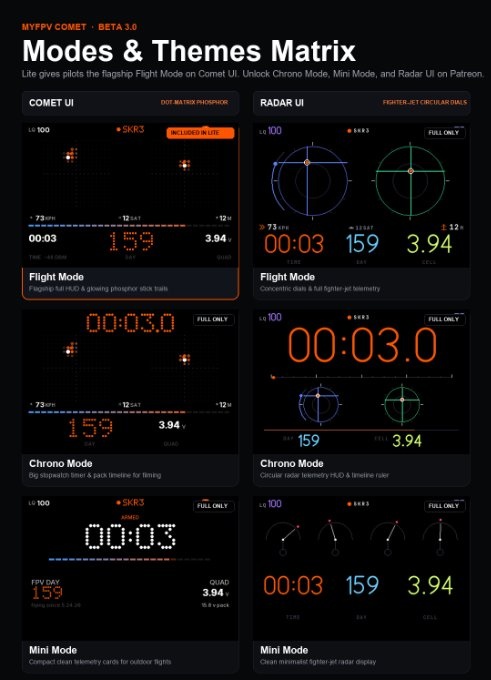
Modes & Themes Matrix
Lite gives pilots the flagship Flight Mode on Comet UI. Unlock Chrono Mode, Mini Mode, and Radar UI on Patreon.
Feature Breakdown (Lite vs Full)
Lite gives you the essential Comet Flight HUD; Full unlocks the complete suite and both UIs.
| FEATURE | LITE | FULL |
|---|---|---|
| Comet UI — Flight Mode Full HUD with glowing phosphor stick trails | ✓ | ✓ |
| Live GPS Row Speed, Satellites, Altitude | ✓ | ✓ |
| 32-Segment Fuel / Throttle Bar Real-time throttle output and battery gauge | ✓ | ✓ |
| Light & Dark Theme Display Modes High-contrast outdoor sunlight mode | ✓ | ✓ |
| Quad Detection ELRS Bind, Rename Quad, Find Quad | ✓ | ✓ |
| Sim Mode & RF Sleep Battery saving when connected to PC simulator | ✓ | ✓ |
| Comet UI — Chrono Mode Big stopwatch timer & pack timeline for filming | LOCKED | ✓ |
| Comet UI — Mini Mode Compact clean telemetry cards for outdoor flights | LOCKED | ✓ |
| Radar UI — All 3 Modes Fighter-jet circular telemetry dials & timeline | LOCKED | ✓ |
| Change Betaflight Rates on Radio Direct rate profile adjustment via stick inputs | LOCKED | ✓ |
| Flight Journal Pack tracking, lifetime hours, flight stats | LOCKED | ✓ |
| Crash Recovery QR & Custom Accents Personalized callsign and custom color schemes | LOCKED | ✓ |
Works on EdgeTX Color & Monochrome radios. Flight mode on Comet UI is identical between Lite and Full. GPS row and throttle bar display on color screens.